
ProfileSpider
AI-powered Chrome extension for one-click profile extraction from LinkedIn, Sales Navigator, GitHub, and any website. Extracts up to 200 profiles per page with 1 credit — GDPR-friendly local storage.
The Complete Beginner's Guide to ProfileSpider: AI-Powered Profile Scraper Chrome Extension
Introduction
ProfileSpider is an AI-powered Chrome extension that enables sales professionals, recruiters, marketers, and researchers to extract structured profiles from LinkedIn, GitHub, Twitter, company websites, and virtually any website with profile information — all in a single click. Unlike traditional scrapers that require CSS selectors, XPath expressions, or technical configuration, ProfileSpider uses AI to intelligently understand webpage structure and extract up to 200 profiles per page automatically.
ProfileSpider is purpose-built for professionals who need to build outbound lead lists, source candidates, or gather contact data without spending hours on manual research. It's especially well-suited for LinkedIn prospecting: extract an entire search result page or Sales Navigator results in seconds rather than clicking through 200 individual profiles. Data stays local in the browser (IndexedDB), making it GDPR-friendly with zero external tracking.
The unique value proposition is cost efficiency: ProfileSpider charges 1 credit per page — not per profile. This means extracting 200 profiles costs the same as extracting 1 profile from the same page, making it up to 200x cheaper than per-profile competitors for bulk extraction workflows.
Pricing: Free plan — 20 one-time credits, max 5 profiles/page. Starter plan — $7/month ($90/year), 2,400 yearly credits, max 25 profiles/page. Pro plan — $15/month ($190/year), 6,000 yearly credits, max 100 profiles/page. Power plan — $32/month ($390/year), 18,000 yearly credits, max 200 profiles/page. Credit top-ups available (100 credits for $10, 250 for $20, 500 for $30). Credits never expire. Official Pricing Page →. Prices subject to change.
Getting Started
ProfileSpider is a Chrome extension (Chrome version 114+) available on the Chrome Web Store. Works on Chrome and all Chromium-based browsers: Edge, Brave, Opera. Installation takes under 30 seconds — no account required to install. Pin the extension to the toolbar for one-click access.
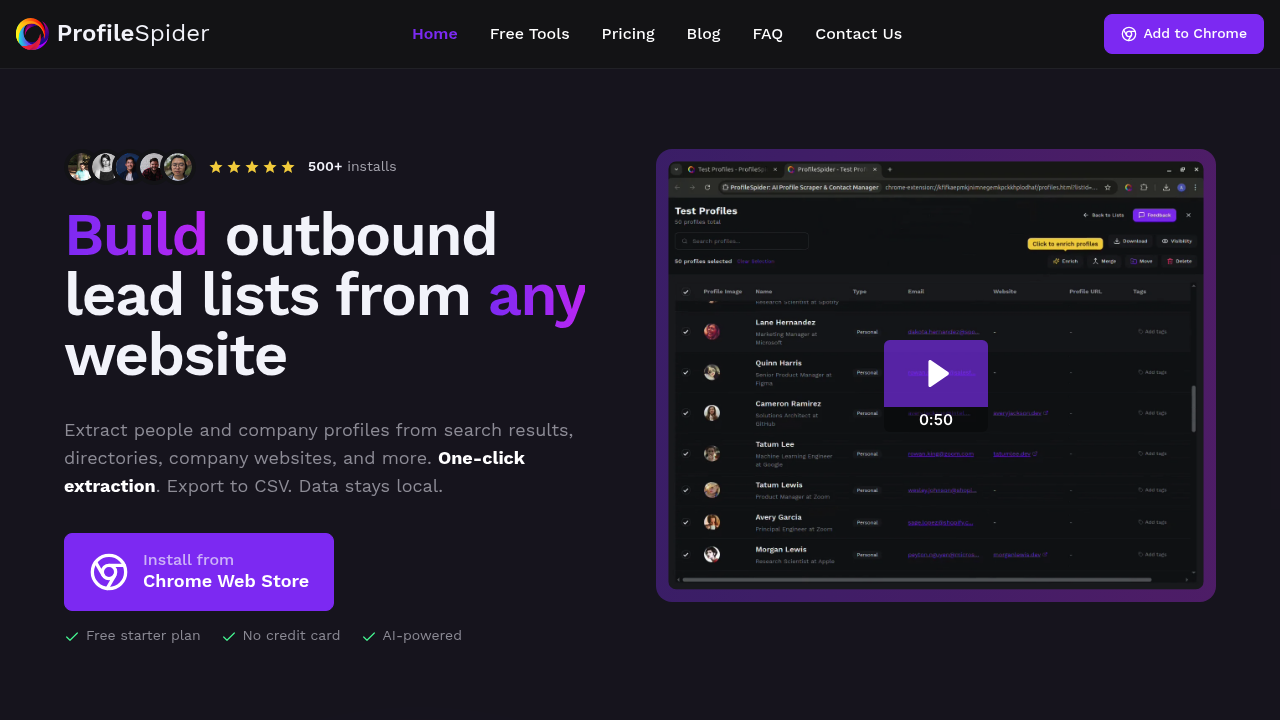
The extension interface includes a profile extraction view, a saved lists manager, and an export panel. All data is stored locally in IndexedDB in your browser — nothing is sent to external servers unless you explicitly export. The workspace supports unlimited custom lists, tagging, and notes for organizing extracted leads by project or campaign.
Core Features
- One-Click Bulk Extraction: Capture 1 to 200 profiles from any search results page, directory, or team page in a single click. No scripts, no configuration, no waiting. Works on LinkedIn, LinkedIn Sales Navigator, GitHub, Twitter/X, company team pages, and any website with profiles.
- AI Profile Classification: Intelligent AI identifies whether a page contains person profiles or company records, maps field relationships, and extracts structured data (name, title, company, location, email, phone, links). Adapts to any website layout automatically.
- Profile Enrichment via Sub-Page Extraction: Follow profile URLs or website links on saved records to pull additional structured data and merge it automatically. Enrich one profile or many in the background while continuing other work.
- Local Data Storage (GDPR-Friendly): All extracted data stored locally in the browser using secure IndexedDB. Zero external tracking. Users maintain complete data ownership and control.
- Export to CSV, JSON, Excel: Export clean lists with custom column selection to any CRM, ATS, or outreach tool. Compatible with HubSpot, Salesforce, Airtable, and any CSV-accepting platform.
- List Management with Tags & Notes: Create unlimited lists per project, add custom tags and notes to individual profiles, search and filter your saved contacts instantly.
First Project Tutorial
Install the extension from the Chrome Web Store and pin it to your toolbar. Navigate to a LinkedIn search results page or Sales Navigator search filtered to your ICP. Click the ProfileSpider extension icon — the AI analyzes the page and presents detected profiles for extraction. Click "Extract All" to capture up to 200 profiles (limit depends on your plan).
Extracted profiles land in your ProfileSpider workspace. Review, tag, and organize them into a named list for your current campaign. If you need additional data (email, company website), use sub-page enrichment to follow profile links automatically.
When ready, export to CSV with the columns your CRM needs: name, title, company, LinkedIn URL, email, phone. Import directly into HubSpot, Apollo, or your outreach tool of choice.
Pro tips: Pro and Power plans allow up to 100–200 profiles per page — use them for full Sales Navigator result pages. Credits are consumed per page processed (even if 0 profiles found), so pre-filter search results to maximize profiles per extraction.
Best Practices & Optimization
Combine ProfileSpider with LinkedIn Sales Navigator for the highest quality prospect lists: set precise ICP filters in Sales Nav, then extract up to 200 matching profiles per search result page in one click. This is significantly faster than Apollo or manual LinkedIn scraping for Sales Nav users.
Use sub-page enrichment after initial extraction to fill in missing company details and contact links. Organize by project using separate lists with descriptive tags (e.g., "ICP-US-SaaS-Q2") to keep data clean across multiple campaigns or clients.
Pros and Cons
- Pro: Zero technical setup — AI handles website structure automatically.
- Pro: 1 credit per page (not per profile) — up to 200x cheaper for bulk extraction.
- Pro: Works universally on any website with profiles, not just LinkedIn.
- Pro: GDPR-friendly local data storage with full user data ownership.
- Con: Chrome/Chromium only — no Firefox or Safari support.
- Con: Free plan limited to 5 profiles per page and 20 one-time credits.
- Con: Browser extension only — no standalone app or server-side automation.
What Users Are Saying: Real Reviews & Feedback
Summary of Community Sentiment: Reddit and Product Hunt users praise ProfileSpider for its universal extraction capability and resistance to LinkedIn detection (as a browser extension versus external scrapers). Sales and recruiting professionals highlight the cost efficiency for bulk extraction. Some users note the free plan is limited for production use.
- How to Build a LinkedIn Scraper That Actually Works – r/SaaS Discussion
- ProfileSpider Launch – Product Hunt
- Best LinkedIn Sales Navigator Scraper – r/nocode Discussion
Key User Insights: Professionals love the one-click extraction for Sales Navigator pages and the privacy-first local storage model. Chrome-only limitation is the most cited constraint. Have you tried ProfileSpider? Share your experience in the review section below to help other professionals make the right choice!
Summary
ProfileSpider offers a uniquely accessible and cost-effective approach to LinkedIn and web profile extraction: no configuration, AI-powered universal compatibility, and per-page pricing that makes bulk extraction dramatically cheaper than per-profile alternatives. Its GDPR-friendly local storage model appeals to privacy-conscious teams, and the Chrome extension delivery makes it harder for LinkedIn to detect versus server-side scrapers. Recommended for sales teams, recruiters, and researchers who need fast, clean prospect lists from LinkedIn and beyond.
Reviews
No reviews yetSimilar tools in category

ContentIn
Generate high-quality written content tailored to your needs.

Crystal Knows
A platform that analyzes personality traits to enhance communication and collaboration.

Grammarly
An AI-powered writing assistant that enhances clarity, grammar, and style in your text.